
RankMeOff Blog
Your New Page Is Invisible to Google Right Now. How Long Indexing Really Takes (and 5 Ways to Speed It Up)
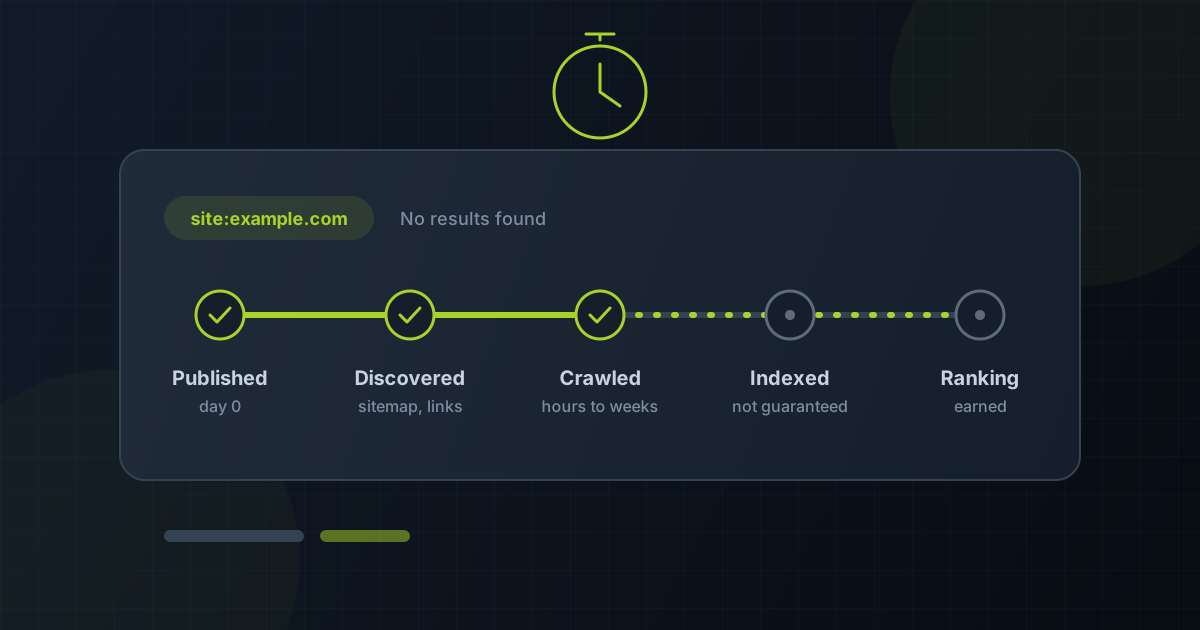
“How long does it take Google to index a page?” is one of the most searched questions in SEO, and the honest answer is: anywhere from a few hours to several weeks, with no guarantee at all. The wait depends on how Google discovers the page, how often it crawls your site, and whether the page is worth indexing. You cannot force it, but you can remove most of the delay.
What people are actually searching for
Look at the questions site owners type into Google after publishing: “how long does it take Google to index a page”, “how to get Google to index my site faster”, “why is my new page not showing on Google”, “request indexing not working” and “how often does Google crawl my site”. They are all the same worry in different words: I published something and nobody can find it yet.
This guide answers that worry directly. If a page has been waiting for weeks rather than days, start instead with why a URL is not getting indexed, because a long wait is often a symptom of a specific blocker.
The realistic timeline: hours to weeks
Google’s own documentation says crawling can take anywhere from a few days to a few weeks after you ask for it. Pages on large, frequently updated sites are often picked up within hours, because Googlebot already returns many times a day. A brand-new page on a young site with few links can sit for weeks before its first visit.
Indexing is a separate step from crawling. After Googlebot fetches the page, Google decides whether it is worth keeping. Duplicate, thin or low-value pages can be crawled and still left out. That is why “crawled, currently not indexed” exists as a status in Search Console.
What decides how long you wait
- Discovery. Google has to find the URL first, through a sitemap, an internal link or a link from another site. An orphan page with no links pointing to it may never be found.
- Crawl demand. Sites that publish and update often, and that people link to, are visited more often.
- Server health. Slow responses and 5xx errors make Google crawl more cautiously, which slows everything down.
- Page quality and uniqueness. A page that adds little beyond what is already indexed may be crawled and then skipped.
- Directives. A stray noindex tag, a robots.txt block or a canonical pointing elsewhere stops indexing no matter how long you wait.
5 ways to shorten the wait
- Submit an up-to-date sitemap in Search Console, with an accurate lastmod date, so new URLs are discovered without waiting for a link. Pull your current sitemap with the Sitemap Extractor to confirm the new page is actually in it.
- Link to the new page from pages Google already visits often, such as your homepage, a category page or a popular article. Internal links are one of the fastest discovery routes you control.
- Request indexing for the few URLs that matter most with the URL Inspection tool. It is rate-limited and does not guarantee indexing, so reserve it for important pages rather than every post.
- Remove blockers before you ask. Run the URL through the Noindex Checker and the Redirect Checker, and work through our URL indexability checklist. Requesting a crawl of a blocked page wastes the request.
- Use IndexNow for Bing and Yandex. Those engines accept instant change notifications through IndexNow. Google does not use IndexNow, so it does not speed up Google, but it gets the page in front of other engines the same day.
Check whether it worked, without guessing
A site: search is a rough signal, not a reliable test. For your own verified property, Search Console’s URL Inspection tool shows Google’s own record. For a quick point-in-time check on any URL, RankMeOff’s Google Index Checker shows whether the page currently appears in results, with evidence from the check. Our guide on how to check if a page is indexed compares the methods.
If a page is indexed but still gets no traffic, the problem has moved from indexing to ranking. See why a website is not ranking on Google for the next set of checks.
Sources and further guidance
Frequently asked questions
How long does Google take to index a new page?
Anywhere from a few hours to several weeks. Established, frequently updated sites tend to be faster; new sites with few links tend to be slower. Google does not guarantee that any page will be indexed.
Can I pay to get indexed faster by Google?
No. Google does not sell faster crawling or indexing. Any service promising guaranteed Google indexing is overstating what it can do. You can only improve discovery, remove blockers and make the page worth indexing.
Does clicking Request Indexing more than once help?
No. Repeated requests for the same URL do not move it up the queue. Request once after the page is ready, then check again after a few days.
Does IndexNow work for Google?
No. IndexNow is supported by engines such as Bing and Yandex. For Google, use a sitemap, internal links and the URL Inspection tool.